The Sinking City 2 Beginner's Guide: Your First Hours in Drowned Arkham
New to The Sinking City 2? This beginner's guide covers everything you need to survive your first hours in flooded Arkham — movement, boats, looting, and more.
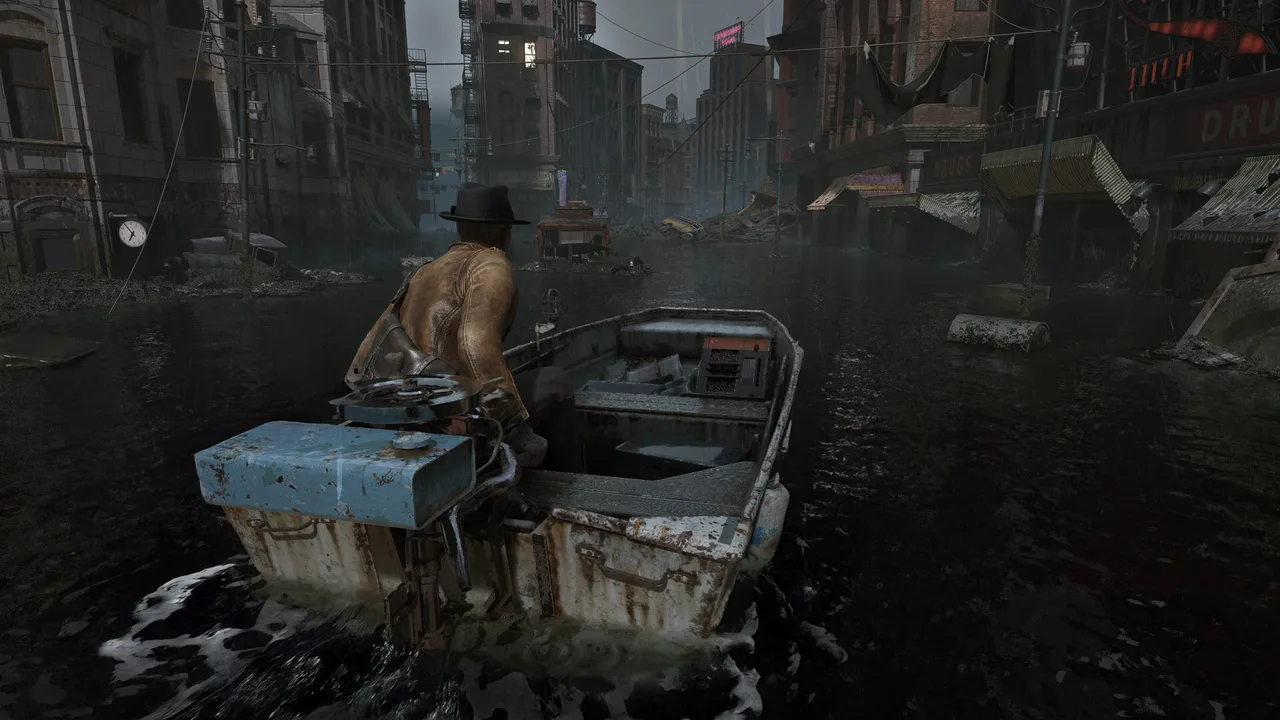
Arkham is underwater, something ancient is stirring beneath the flood, and the person you love most is somewhere in the middle of it. The Sinking City 2 doesn’t ease you in gently. Within the first twenty minutes you’ll be rowing through drowned streets, scrounging for bullets, and deciding whether that shape in the hallway is worth the ammo.
This guide covers everything a new player needs to get through those critical opening hours without drowning — literally or figuratively. If you’ve played the first Sinking City, forget the open-world detective rhythm. This is a different beast.
What Kind of Game Is This, Really?
The Sinking City 2 is a third-person survival horror game built in Unreal Engine 5 by Frogwares, the Ukrainian studio behind the original. The genre shift matters: where the first game leaned into detective work and open-world exploration, TSC2 leans hard into resource scarcity, atmospheric dread, and moment-to-moment survival tension.
You’re still in Arkham. You’re still dealing with Lovecraftian horrors. But the tone is closer to classic survival horror — think Resident Evil’s resource anxiety married to Lovecraft’s cosmic nihilism. Every bullet counts, every room you enter could be a mistake, and the investigation system is entirely optional. You can engage with clue-hunting and puzzles for extra rewards and lore, or you can focus purely on staying alive and pushing forward.
The game is semi-open world. You travel between districts by boat on the flooded streets and waterways, then dock and explore on foot. It’s not a massive open sandbox — it’s interconnected zones, each with their own personality and hazards.
Before You Leave the First Safe Room
Settings Worth Adjusting
Before you even step outside, spend a minute in the options menu. Based on the demo and genre conventions, a few things are worth checking:
- Brightness/gamma: TSC2 is dark by design. Resist the urge to crank brightness up. Set it so you can barely see the calibration image — the darkness is a game mechanic, not a flaw.
- Audio mix: Turn music down slightly and effects/ambient up. Hearing a creature shuffle behind a wall before you see it is the difference between preparation and panic.
- Control sensitivity: If you’re on controller, the demo felt slightly sluggish on default aim sensitivity. Bump it up a notch or two — you’ll need to react fast.
- Subtitles: Turn them on. Dialogue occasionally overlaps with ambient sound design, and the environmental storytelling relies heavily on NPC conversations you might otherwise miss.
Read Everything in Your Starting Area
The opening location likely functions as a tutorial space. Examine every note, every object interaction prompt, every environmental detail. Survival horror games front-load critical information here — crafting recipes, mechanical explanations, lore that hints at what’s coming. Don’t rush through it just because it feels safe.
Getting Into the Boat
Your boat is your lifeline. Arkham’s streets are rivers now, and the boat is how you move between districts, find supply caches, and — critically — escape things you can’t fight.
Based on the demo, boat navigation is straightforward but deliberate. You’re not piloting a speedboat; you’re rowing through debris fields and half-submerged architecture. A few things to keep in mind:
- The boat is (mostly) safe: enemies don’t typically attack you while you’re on the water, though that probably won’t hold true in every district. Think of the boat as a mobile safe room with caveats.
- Watch for dock points: you can’t just hop off anywhere. Look for wooden platforms, intact piers, or ladder access points. Missing a dock means rowing around the block.
- Debris and obstacles: flooded streets are choked with wreckage. Some paths are blocked entirely, funneling you through specific routes. Pay attention to the flow — blocked paths sometimes open up later as the flood reshapes the environment.
- Supplies float: keep your eyes on the water surface. Boxes, bags, and containers float past or get caught on debris. These are worth grabbing — every resource helps.
For a deeper look at waterway routes and boat mechanics, check the boat navigation guide.
The Core Loop: Explore, Loot, Survive
Once you dock and start exploring on foot, the survival loop kicks in. Here’s what your first few hours boil down to:
Looting: Pick Up Everything (At First)
Early on, grab anything that isn’t nailed down. Ammo, crafting materials, healing items, key items — your inventory is limited, but in the opening hours you won’t have enough of anything to be picky. That changes later when you start making hard choices about what to carry, but right now? Hoard.
| Priority | Item Type | Why It Matters |
|---|---|---|
| High | Ammunition | Scarce and essential — every missed shot hurts |
| High | Healing items | You will take damage, and often |
| High | Crafting materials | Needed for ammo, healing, and repairs |
| Medium | Key items / clues | Progress the story or unlock optional investigation content |
| Low | Duplicate resources when full | If your inventory is packed, leave low-priority items for later |
For a full breakdown of what to keep and what to leave behind, the resource management guide goes much deeper.
Movement and Awareness
TSC2 rewards cautious movement. Don’t sprint through rooms. Don’t open doors without listening first. The game’s audio design is built to give you information — a wet shuffling sound, a low growl, the creak of a floor above you. Use it.
- Walk, don’t run: sprinting makes noise. Noise attracts things. Simple equation.
- Use your flashlight deliberately: light reveals threats, but it also reveals you. Toggle it off in rooms where you don’t need it.
- Check corners and ceilings: Lovecraftian creatures don’t always approach from eye level. The Slither especially have a tendency to lurk in unexpected positions.
When to Fight and When to Run
This is the single most important skill in any survival horror game, and TSC2 makes the stakes brutally clear: you do not have enough ammunition to kill everything.
That’s not hyperbole. Resource scarcity is a core design philosophy. Frogwares has been explicit about this — the game wants you to feel underpowered. So the question isn’t “can I kill this?” It’s “should I?”
Fight When:
- The enemy is blocking the only path forward and there’s no way around
- You have a clear shot at a weak point and can end it in one or two rounds
- You’re cornered and fleeing isn’t an option
- The enemy is a Slither caught in a narrow space where it can’t maneuver
Run When:
- You have a clear escape route behind you
- The enemy hasn’t noticed you yet and you can sneak past instead
- You’re low on ammo or health
- There are multiple enemies — two-on-one fights chew through resources catastrophically
- The thing you’re looking at doesn’t seem like it follows normal rules (reality-bending shadows are generally not worth engaging)
The combat guide breaks down enemy weak points and weapon effectiveness in detail. For now, just remember: running is not cowardice. Running is resource management.
The Investigation System: Optional but Rewarding
Here’s something that sets TSC2 apart from most survival horror games: the investigation system is entirely optional. You can finish the game without engaging with a single clue, puzzle, or deduction. The main path never hard-gates behind investigation content.
But you probably shouldn’t skip it entirely.
The investigation system — inherited and evolved from Frogwares’ detective game DNA — rewards you with alternate routes through dangerous areas, additional lore that contextualizes the horror, and reportedly upgrade materials you can’t get any other way. It’s risk-reward: spending time searching a room for clues means spending more time in a dangerous environment, but the payoff can be a shortcut that saves you ammo later.
Based on the demo, investigation works something like this:
- Find clues scattered in the environment — documents, objects, environmental details
- Connect clues to form deductions about what happened in a location
- Use those deductions to unlock new options — a door code, a hidden passage, a mechanical puzzle solution
You don’t need to find every clue. You don’t need to solve every puzzle. But when you spot investigation-related prompts in a relatively safe area, take the time. The investigation guide covers the full system once the game launches.
Your First Enemy Encounter
It’s going to happen sooner than you’d like. Based on the demo’s prologue, your first hostile encounter introduces the basic threat loop: you hear something, you see something, and you have about three seconds to decide what to do.
A few survival principles for that first fight:
- Don’t panic-fire. Aim for the head or whatever glowing/exposed weak point the creature shows. Body shots burn ammo for minimal effect.
- Use the environment. Doors can be closed. Furniture can be used as barriers. Narrow corridors limit enemy approach angles.
- Retreat is always an option unless you’re literally cornered. Back up, create distance, reassess.
- Heal after the fight, not during. Unless you’re about to die, finish the encounter first, then use healing items in safety. Healing mid-combat wastes time and leaves you vulnerable.
Read the survival basics guide for a deeper look at the stealth and awareness systems that keep you alive between fights.
Quick-Reference Tips for Your First Session
| Tip | Why |
|---|---|
| Save manually and often | Autosave spacing is expected to be generous, not frequent — don’t rely on it |
| Don’t explore every building in a district immediately | Some areas are clearly above your current gear level — come back later |
| Listen before opening any door | Audio cues telegraph what’s on the other side |
| Keep at least a few rounds in reserve | Never spend your last bullets on a non-essential fight |
| Try the free prologue demo first | It’s available on Steam and covers roughly an hour of gameplay — perfect for learning the basics risk-free |
The Mood of the Game
One last thing that isn’t a mechanical tip but matters anyway: The Sinking City 2 is slow on purpose. The rowing is slow. The exploration is slow. The building dread before a creature appears is slow.
That’s not padding. That’s tension. The game wants you sitting in the quiet, listening to water lap against a doorframe, wondering what made that sound upstairs. If you try to play it like an action game — sprinting room to room, shooting everything, ignoring the atmosphere — you’ll run out of resources by the third district and the horror won’t land.
Slow down. Let the water rise around you. Arkham has been waiting a long time for someone to come looking, and it’s patient. You should be too.
What to Read Next
Now that you’ve got the fundamentals, branch out:
- Survival Basics — the core mechanics that keep you alive
- Combat Guide — weapon handling, enemy weak points, and engagement tactics
- Resource Management — what to carry, what to craft, what to leave behind
- Investigation Guide — how the optional clue system works and why it’s worth your time
Frequently asked questions
Do I need to play The Sinking City 1 before starting The Sinking City 2?
No. The Sinking City 2 is a standalone story set in a different version of Arkham. You don't need any prior knowledge — though fans of the first game will catch a few thematic echoes.
Is The Sinking City 2 open world?
It's semi-open. You travel between flooded districts by boat and explore them on foot, but it's not the fully open sandbox the first game was. Think of it as interconnected zones with a tighter, more survival-horror-focused structure.
What platforms is The Sinking City 2 available on?
The Sinking City 2 releases August 18, 2026 on PC (Steam, Epic, GOG), PS5, and Xbox Series X|S.