The Sinking City 2 PC Settings Guide: Maximizing UE5 Performance and Fixing HDR Issues
Optimize your return to drowned Arkham. Discover the best PC settings for The Sinking City 2, workarounds for the missing FSR support, and how to fix HDR black crush.
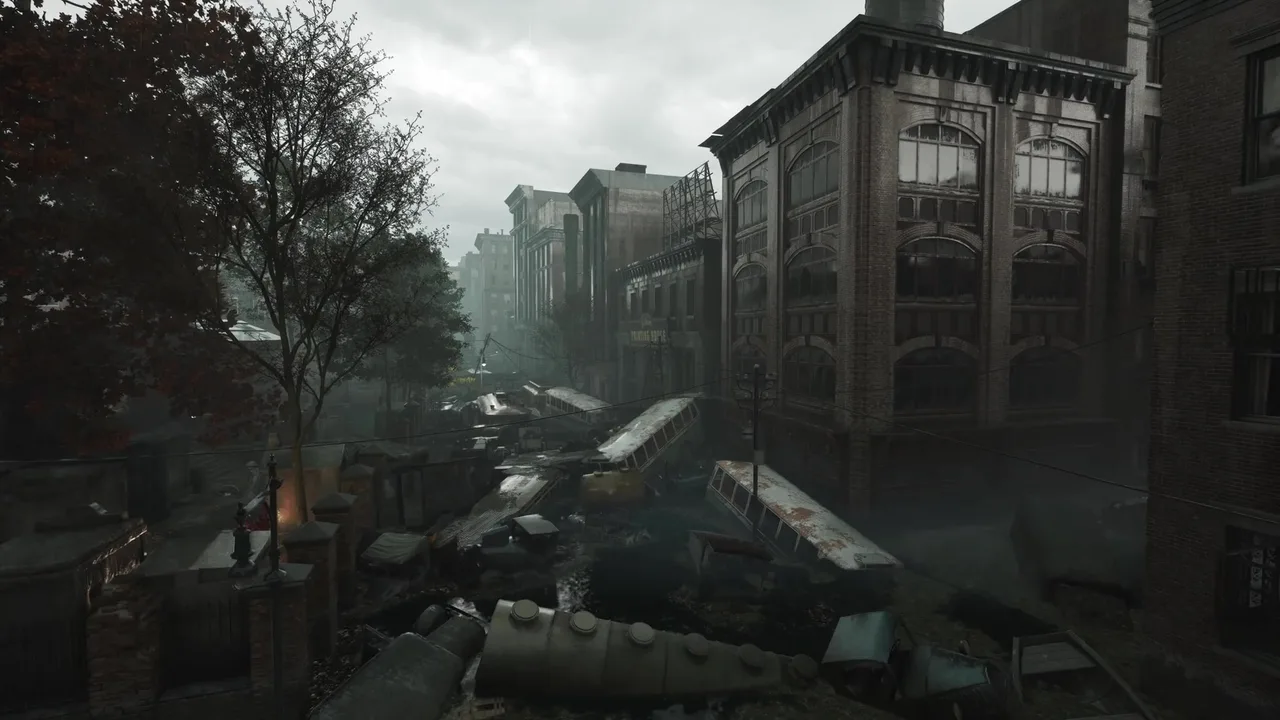
The release of The Sinking City 2 marks a bold new era for Frogwares. Abandoning the open-world detective focus of the 2019 original set in Oakmont, the studio has fully embraced strict survival horror within the drowned ruins of Arkham. Powered by Unreal Engine 5, the visual leap is undeniable. The rotting gothic architecture, the oppressive volumetric fog, and the disturbingly fluid animations of the monstrous inhabitants all contribute to a terrifying atmosphere. However, this impressive graphical fidelity comes at a steep cost to your hardware. With the game officially out in the wild, PC players are quickly discovering that surviving this Lovecraftian nightmare requires more than just careful ammo management—it demands rigorous optimization of your system settings.
The Weight of Unreal Engine 5 in True Survival Horror
The visual identity of this sequel relies heavily on the juxtaposition of scarce light and impenetrable darkness. As you explore the decaying, water-logged interiors of abandoned manors and flooded hospitals, your primary defense against the encroaching madness is often a simple, flickering lantern. The way the engine handles volumetric lighting rolling off the dark waters, combined with the dynamic shadows cast by your light source, creates a pervasive sense of dread. The environment acts as an active antagonist, working constantly against your sanity.
Rendering these complex lighting scenarios in real-time is the exact reason why optimization is proving to be a massive hurdle for the PC community during this launch window. Frame rates directly dictate your survival odds. Frogwares has designed combat to be fiercely punishing. Ammunition is exceedingly rare, and enemies are resilient. When you are aiming your revolver at the erratic, twitching movements of the Slither, a sudden stutter or frame time spike will likely cause a missed shot. In a game where every bullet counts, lost performance translates directly to lost progress and rapidly depleting health. Understanding the technical quirks of this specific Unreal Engine 5 implementation is crucial for anyone trying to reach the end credits without throwing their mouse in frustration.
The Upscaling Dilemma: DLSS Dominance and Missing FSR
One of the most glaring technical anomalies currently dominating community discussions is the upscaling situation. Modern Unreal Engine 5 titles heavily rely on temporal upscalers to achieve playable frame rates, especially when heavy features like Lumen are active. While Nvidia users can comfortably rely on DLSS to smooth out the experience, community testing has revealed a frustrating reality for AMD owners: the game reportedly lacks FSR support at launch.
Threads on hardware forums are filling with complaints from users running high-end AMD hardware, such as the RX 9070, who find themselves entirely locked out of their preferred upscaling solution. PC gaming in 2026 heavily normalizes hardware-agnostic upscalers, and launching a highly demanding title without FSR support forces a large portion of the player base into a performance bottleneck. Players are rightfully questioning why such a crucial feature was omitted, given the heavy utilization of modern rendering techniques.
Without FSR, non-Nvidia players are forced to fall back on Unreal Engine’s native Temporal Super Resolution (TSR) or play at native resolution. Unfortunately, early community reports strongly indicate that the current implementation of TSR in the game is bugged. According to technical deep-dives on Reddit, activating TSR applies a significantly lower internal rendering resolution than intended, resulting in a blurry, muddy image that compromises the intricate environmental storytelling of the setting. Until Frogwares addresses this via a post-launch patch, players without RTX cards face a difficult compromise between visual clarity and smooth gameplay.
Community-Optimized Settings for Stable Framerates
So, what settings actually move the needle? Thanks to rigorous testing by the PC gaming community over the past forty-eight hours, a clear picture of the game’s graphics menu has emerged. The engine does not scale traditionally across all sliders. In fact, many settings appear to be completely disconnected from actual performance metrics. Here is the breakdown of what actually impacts your GPU:
- Global Illumination (The Heavy Hitter): As expected from a UE5 title, GI governs the Lumen lighting system. It is by far the most demanding option in the menu. Lowering Global Illumination to the ‘Low’ preset reportedly disables Lumen entirely, reverting the game to standard rasterized lighting. While this significantly flattens the lighting in atmospheric areas, it provides an enormous boost to frame rates for struggling machines that barely meet the PC system requirements.
- Reflections: Arkham is a city swallowed by the sea. You will spend hours navigating your boat through The Submerged Quarter and wading through waist-deep water in flooded basements. Screen space reflections and Lumen reflections are constantly calculating the bouncing light off these undulating water surfaces. Dropping the Reflections setting from Ultra to High or Medium can stabilize frame pacing during outdoor boating sections without ruining the overall wet aesthetic.
- Hair Rendering: Frogwares has implemented a strand-based hair rendering system that looks fantastic in cutscenes but taxes the GPU heavily during active gameplay. Community benchmarks show that setting Hair to anything below ‘High’ effectively disables the strand simulation, replacing it with simpler, traditional geometry. This is an easy sacrifice that barely affects the moment-to-moment horror experience.
Interestingly, several graphical sliders appear to be non-functional or purely placebo in the current build. Multiple optimization threads have noted that adjusting View Distance and Foliage yields absolutely no measurable change in either frame rate or visual density. Whether you set them to Low or Ultra, the engine seemingly renders the exact same number of objects. Furthermore, the Textures setting appears to manage itself dynamically based on your available VRAM pool. Focus your tweaking efforts purely on Illumination, Reflections, and Hair.
Fixing HDR “Black Crush” via RenoDX
Beyond standard settings, PC enthusiasts attempting to enhance the visual dread through high dynamic range (HDR) are encountering their own unique nightmares. While the game possesses incredible contrast potential, players utilizing the popular RenoDX tool alongside the UE extended add-on to force better HDR are reporting severe “black crush.”
This visual glitch causes the darkest areas of the screen to lose all shadow detail, turning into completely flat, unreadable black pixels. In a game where eldritch threats lurk in the darkest corners, losing visibility is fatal. Fortunately, the modding community has quickly identified a workaround. If you are using ReShade to inject HDR, you need to open the RenoDX overlay and explicitly disable the “Upgrade Path” option. According to affected users, leaving this enabled forces a conflict with the game’s rendering pipeline that results in the pure black screens. Alternatively, some players are finding temporary success by abandoning the mod and relying on Windows AutoHDR, though the peak brightness and color accuracy are reportedly less impressive.
The Cloud Alternative: GeForce NOW
If you find that no amount of menu tweaking can make Arkham playable on your aging hardware, there is an alternative route that doesn’t involve spending thousands on a new GPU. Nvidia has officially confirmed in their latest GFN Thursday update that the game is now available on GeForce NOW.
For players lacking the local horsepower to run Unreal Engine 5 smoothly, the cloud streaming service allows you to push the game up to 1440p and 120 frames per second on the Ultimate tier. Streaming directly through a browser like Firefox provides a surprisingly viable way to experience the high-end visuals without the local hardware tax.
Mastering the mechanics of combat and weak points means nothing if your screen freezes the moment a Deep One lunges at you from the black waters. Optimizing your PC settings is just as critical as managing your first aid kits and shotgun shells. While the community awaits official patches from Frogwares to address the FSR absence and TSR bugs, careful management of your Global Illumination and Reflection settings will ensure your journey through the drowned city remains a terrifying experience for all the right reasons, rather than a technical disaster.